

FormGuard Setup and Configuration
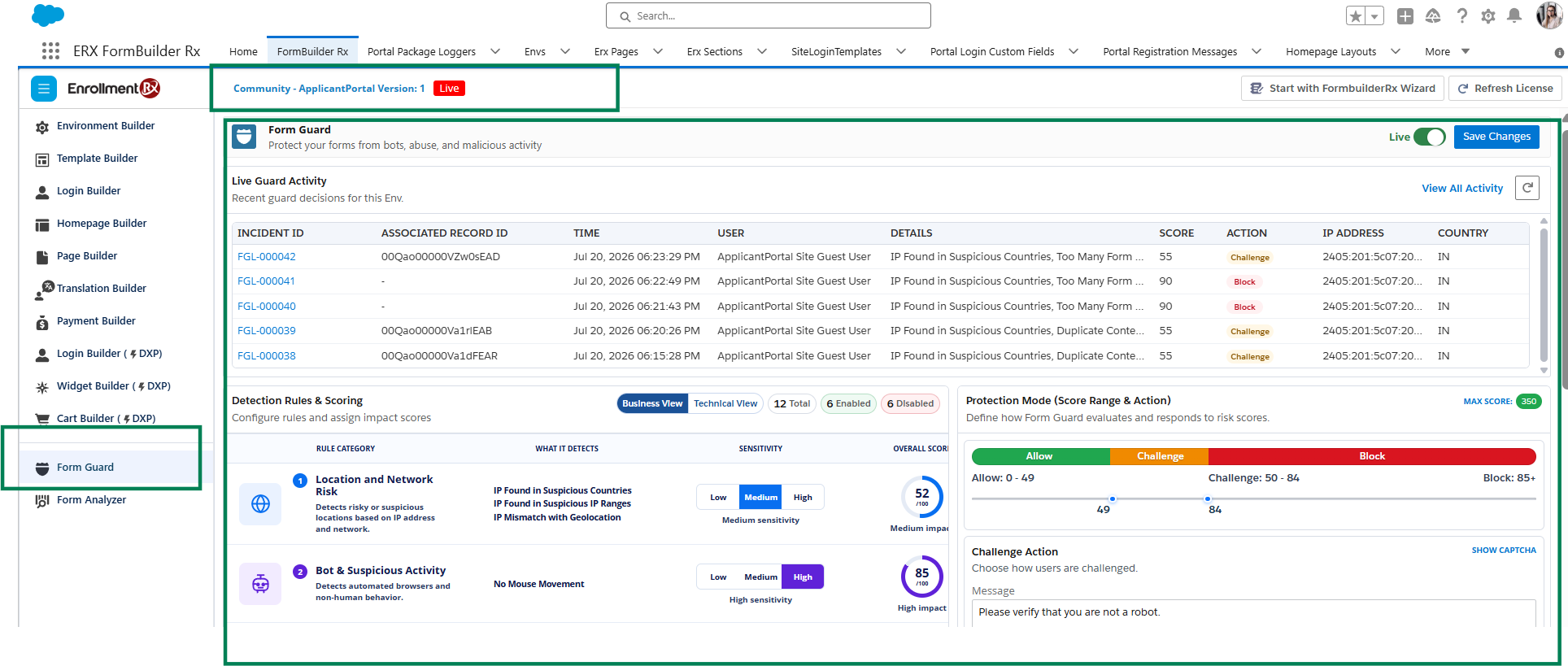
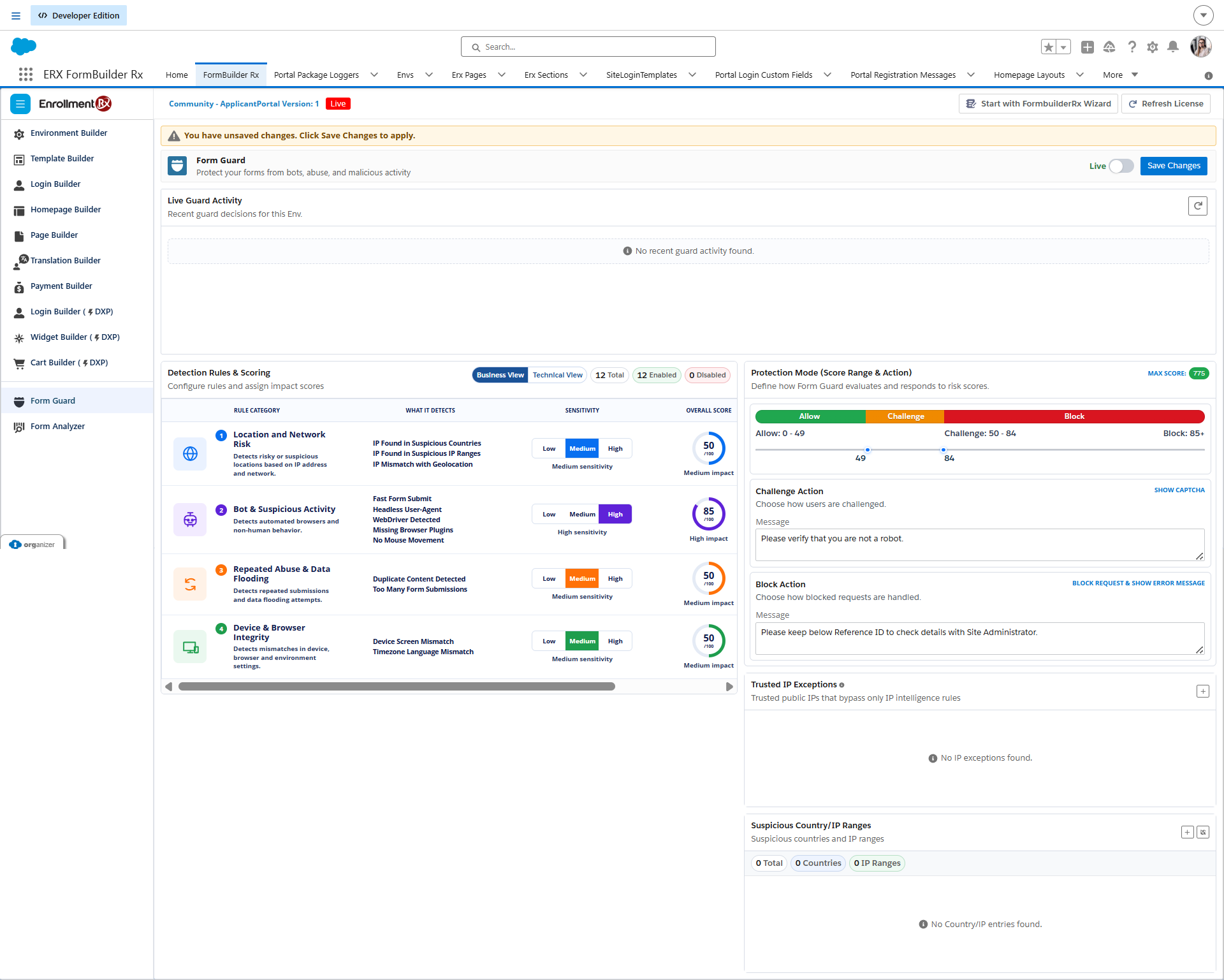
Configure FormGuard for the applicable FormBuilder Rx environment before enabling
protection for guest users. Keep Live turned off while configuring rules,
action ranges, messages, and exception lists.
Important:
Before getting started with setting up rules, please make sure
reCAPTCHA is enabled within the environment you are working on. Follow these steps:
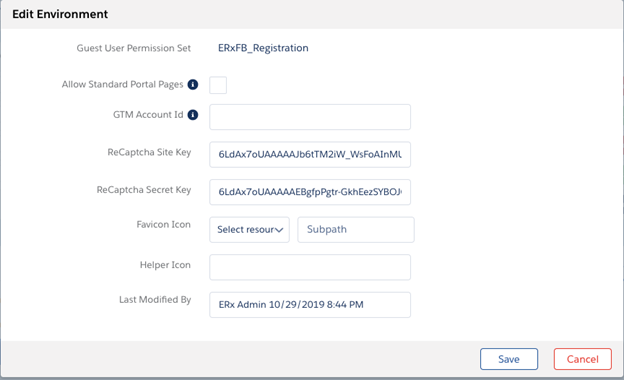
- Go to www.google.com/recaptcha and register your Community’s Site. Record your reCAPTCHA Site Key and Secret Key.
- Edit the FormBuilder Environment and add the reCAPTCHA Site Key and reCAPTCHA
Secret Key here:
Configure FormGuard Allow Object Access (AOA) Access
Apply the following product-level AOA permissions for the Site Guest User used by the public FormBuilder Rx page. All fields required by the package should be available through the FormBuilder Rx AOA configuration.
| Object | API Name | View All | Create | Modify All | Delete | Fields |
|---|---|---|---|---|---|---|
| ERx FB Guard Action | ERx_Forms__ERxFBGaurdAction__c |
Yes | No | No | No | Yes |
| ERx FB Guard Interaction | ERx_Forms__ERxFBGaurdInteraction__c |
Yes | Yes | Yes | No | Yes |
| ERx FB Guard IP Exception | ERx_Forms__ERxFBGaurdIpException__c |
Yes | Yes | Yes | No | Yes |
| ERx FB Guard Log | ERx_Forms__ERxFBGaurdLog__c |
Yes | Yes | Yes | No | Yes |
| ERx FB Guard Rule | ERx_Forms__ERxFBGaurdRule__c |
Yes | No | No | No | Yes |
| ERx FB Guard Suspicious IP/Countries |
ERx_Forms__ERxFBGaurdSuspectedCountriesAndIP__c
|
Yes | No | No | No | Yes |
Access FormGuard
- Open the FormBuilder Rx application.
- Select the target environment.
- Open the FormGuard tab.
- Confirm that Business View opens by default and that Technical View can be selected.
- Keep Live turned off while configuring rules, action ranges, messages, and exception lists.
Main Controls
| Control | Purpose | Required Use |
|---|---|---|
| Live | Controls whether saved rules are enforced for guest users. | Keep Live off during configuration. Turn it on only after approval and save the change. |
| Save Changes | Saves rule enablement, scores, action ranges, messages, submit behavior, trusted IP entries, and suspicious entries. | Save before leaving the page. Confirm that the save completed successfully and that the Live state is correct. |
| Business View | Shows simplified protection categories, sensitivity, average score, and expected action. | Use for an administrator-level summary. |
| Technical View | Shows each detection rule, score, evaluation context, impact, and enabled state. | Use for detailed configuration. |
| Live Guard Activity | Shows recent challenged or blocked requests. | Refresh after a controlled test and open the incident for additional detail. |
| Protection Mode | Defines the score boundaries for Allow, Challenge, and Block. | Set boundaries based on the organization's risk policy and the enabled-rule maximum score. |
Protection Mode
Protection Mode defines how FormGuard responds to the combined score generated by enabled rules.
| Action | End User Result | Configuration Guidance |
|---|---|---|
| Allow | The end user continues without interruption. | Use for the normal or low-risk score range. |
| Challenge | The end user must complete the configured reCAPTCHA challenge. | Use for uncertain or medium-risk traffic. |
| Block | The end user cannot continue and sees the configured block message. | Use for high-confidence suspicious activity. |
Important:
Allow 0-28, Challenge 29-83, and Block 84 and above are examples only.
Actual boundaries are configurable and should be reviewed whenever rule
scores change.
Live Guard Activity
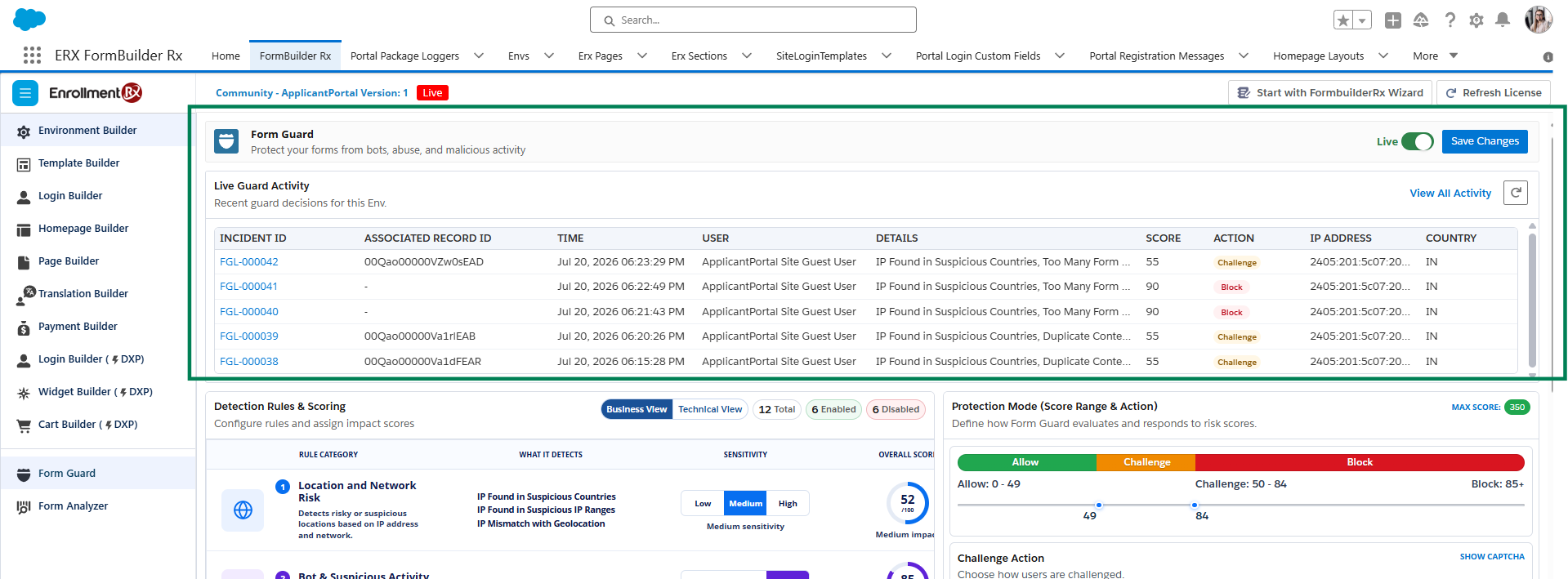
Live Guard Activity shows recent requests that resulted in a Challenge or Block action. After a controlled test, refresh Live Guard Activity and open the applicable incident to review additional information.
| Field | Meaning |
|---|---|
| Incident ID | Unique FormGuard incident reference. |
| Associated Record ID | Salesforce record connected to the event, when available. |
| Time | Date and time of evaluation. |
| User | Guest or site user context. |
| Details | Rule or condition that contributed to the action. |
| Score | Risk score recorded for the event. |
| Action | Challenge or Block. |
| IP Address | Detected public IP address. |
| Country | Country associated with the detected IP address. |
Permission Logging Reference
| Object Label | API Name | View | Create | Modify | Delete | Fields |
|---|---|---|---|---|---|---|
| ERx FB Guard Action | ERx_Forms__ERxFBGaurdAction__c |
Yes | No | No | No | Yes |
| ERx FB Guard Interaction | ERx_Forms__ERxFBGaurdInteraction__c |
Yes | Yes | Yes | No | Yes |
| ERx FB Guard IP Exception | ERx_Forms__ERxFBGaurdIpException__c |
Yes | Yes | Yes | No | Yes |
| ERx FB Guard Log | ERx_Forms__ERxFBGaurdLog__c |
Yes | Yes | Yes | No | Yes |
| ERx FB Guard Rule | ERx_Forms__ERxFBGaurdRule__c |
Yes | No | No | No | Yes |
| ERx FB Guard Suspicious IP/Countries |
ERx_Forms__ERxFBGaurdSuspectedCountriesAndIP__c
|
Yes | No | No | No | Yes |