
Salesforce Security Advisory: Guest User Access
Overview
Salesforce’s Security team published an advisory on March 7, 2026, with an update on March 11, 2026, regarding Experience Cloud Guest User access.
We closely monitor platform-level security advisories to ensure our customers stay informed of emerging risks. This update highlights the importance of reviewing Guest User access configurations within your Salesforce environment, and requires immediate attention from every organization using Experience Cloud sites.
About the Salesforce Security Advisory
Salesforce’s Cyber Security Operations Center (CSOC) has observed activity targeting Experience Cloud sites, where Guest User access is more permissive than necessary.
In some cases, unauthenticated users may be able to access data through publicly exposed endpoints (such as Aura endpoints) when permissions are too broadly configured.
These scenarios are not due to a Salesforce platform vulnerability. Instead, they result from configuration gaps where Guest Users are granted access beyond what is required.
Salesforce recommends that customers review their Guest User Sharing and Access settings to ensure configurations align with intended use.
Enrollment Rx Recommendations and Configuration Steps
Recommendations
- Review your Experience Cloud Guest User configurations
- Validate that access aligns with intended use cases
- Ensure Guest Users are granted only the minimum access necessary
Configuration Steps
Disabling Public API access is the single most important action to take. As part of your review, we also strongly suggest following the below steps to help prevent exposure through publicly accessible endpoints used in current attack patterns.
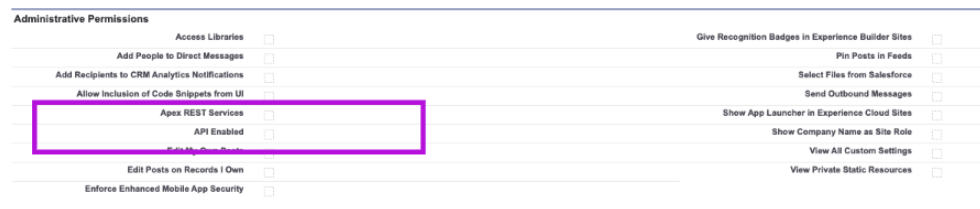
1. Update Guest User Profile Settings
Navigate to your Site Guest User Profile.
- API Enabled
- Apex REST Services (if present)
2. Update Site Settings
Navigate to your Site Settings.
- Allow Access to Standard Salesforce Pages
- Lightning Features for Guest Users
- Guest Access to the Support API

- API Enabled
- Allow guest users to access public APIs
- Allow Access to Standard Salesforce Pages
- Lightning Features for Guest Users
- Guest Access to the Support API
- No Aura context found in response, using dummy context
- Aura token not found, using null token
- Did not find any custom controllers
- Error while retrieving objects and CSP trusted sites
- Error while checking if GraphQL is enabled
- Retrieved information for 0 objects
- No UI record lists for the targeted objects
Testing Guidance
Please test your site after applying the above changes one by one to confirm everything is working as expected. If you encounter any issues, please revert changes and contact us by creating a ticket in the customer portal.
Our Commitment as Your ISV Partner
- We regularly evaluate our implementation approaches to ensure our packages follow sound configuration practices and avoid unnecessary permissiveness.
- Our documentation will be updated with detailed next steps, related to this specific issue, in the coming days. Please review the documentation periodically for the latest guidance and instructions.
- We’re available to review your Experience Cloud setup and help you align it with Salesforce’s latest guidance.
If you have any questions or need assistance validating your Salesforce Experience Cloud or Site security configuration, the Enrollment Rx Professional Services team is available to help. We offer security configuration reviews, implementation guidance, and remediation services to help ensure your environment aligns with Salesforce security best practices and Enrollment Rx recommendations.
To request a security assessment or discuss a Statement of Work (SOW), please contact us at support@enrollmentrx.com. Our team will review your requirements and work with you to define the appropriate scope of services.
We strongly encourage all customers to treat these steps as a security priority and to complete them as soon as possible.